Sensitive Information Disclosure – Secrets Exposed in Base64 Session Cookie | Cookie Cutter
Lab Link
Lab: Cookie Cutter
Overview
The Cookie Cutter challenge demonstrates an information disclosure vulnerability caused by storing sensitive application data directly inside client-side cookies.
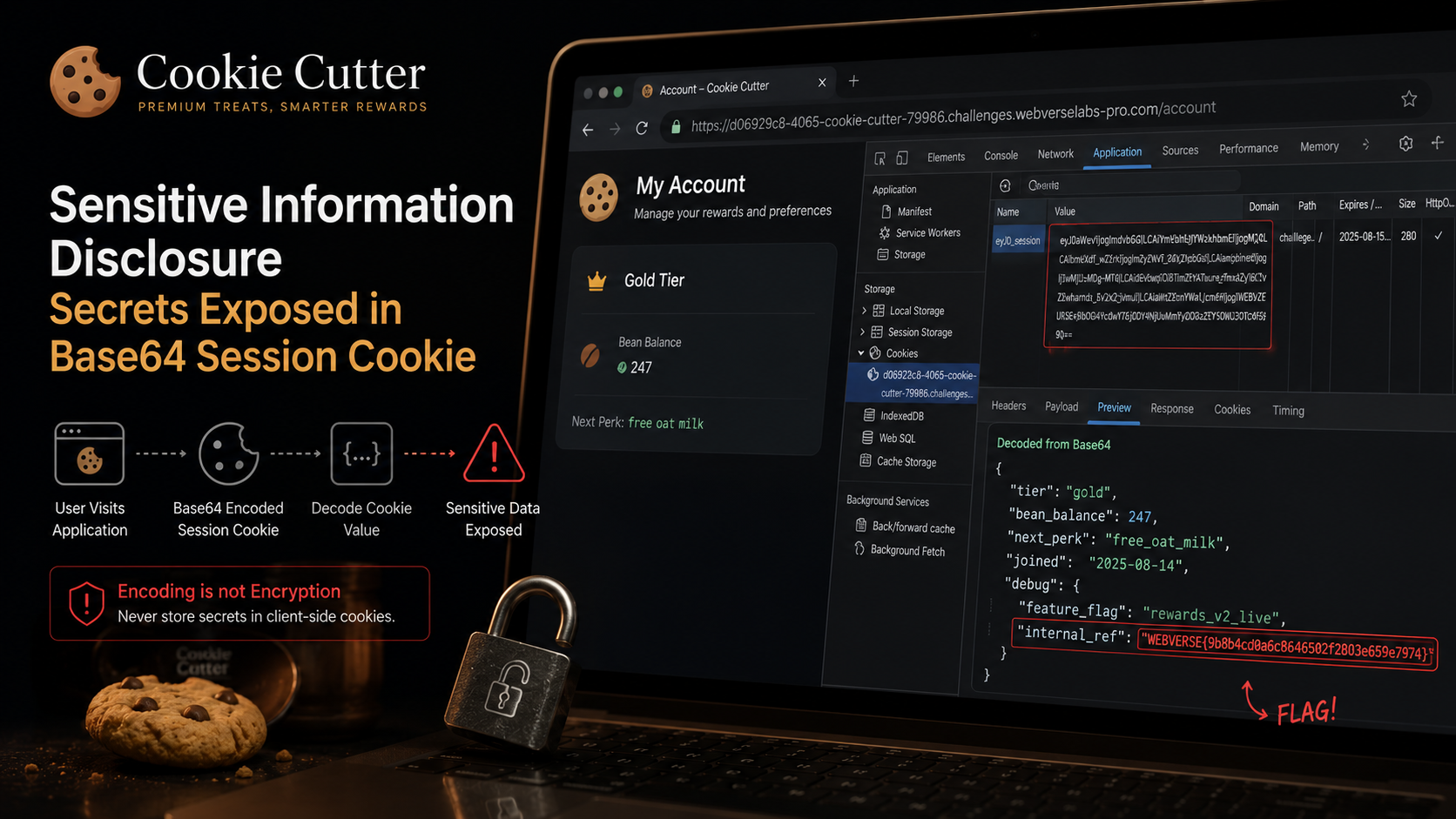
The application attempted to improve performance by placing user state information inside a browser cookie. Rather than storing only a session identifier, the application embedded complete account information and internal debugging data inside an easily reversible format.
Because the cookie was only encoded using Base64 rather than encrypted or protected, sensitive information became immediately visible to users.
Objective
Inspect the application’s session handling mechanism and identify sensitive information disclosure.
Vulnerability Classification Hierarchy
1
2
3
4
5
OWASP Category
└── A02: Cryptographic Failures
    └── Sensitive Information Disclosure
        └── Client-Side Sensitive Data Exposure
            └── Base64-Encoding Sensitive Information Instead of Protecting It
Reconnaissance
Visiting the account functionality:
1
https://d06929c8-4065-cookie-cutter-79986.challenges.webverselabs-pro.com/account
Traffic history was reviewed in Burp Suite.
An interesting observation appeared immediately:
A session cookie was assigned even without registration or authentication.
Cookie:
1
nb_session=eyJ0aWVyIjogImdvbGQiLCAiYmVhbl9iYWxhbmNlIjogMjQ3LCAibmV4dF9wZXJrIjogImZyZWVfb2F0X21pbGsiLCAiam9pbmVkIjogIjIwMjUtMDgtMTQiLCAiZGVidWciOiB7ImZlYXR1cmVfZmxhZyI6ICJyZXdhcmRzX3YyX2xpdmUiLCAiaW50ZXJuYWxfcmVmIjogIldFQlZFUlNFezliOGI0Y2QwYTZjODY0NjUwMmYyODAzZTY1OWU3OTc0fSJ9fQ==
The structure looked suspicious because:
- Large cookies often contain serialized data
- The value resembled Base64 encoding
- Sensitive application state may be stored client-side
Analysis
The cookie was decoded using Base64.
Decoded value:
1
2
3
4
5
6
7
8
9
10
{
    "tier":"gold",
    "bean_balance":247,
    "next_perk":"free_oat_milk",
    "joined":"2025-08-14",
    "debug":{
        "feature_flag":"rewards_v2_live",
        "internal_ref":"WEBVERSE{.....}"
    }
}
The application exposed:
- Loyalty tier information
- Account details
- Internal feature flags
- Debug information
- Sensitive internal reference values
Most importantly:
1
internal_ref
contained the flag.
Proof of Exploitation
Attack flow:
1
2
3
4
5
6
7
8
9
Receive Cookie
        ↓
Identify Base64 Pattern
        ↓
Decode Value
        ↓
Read Embedded JSON
        ↓
Sensitive Information Disclosure
Retrieved value:
1
WEBVERSE{.....}
No authentication bypass or exploitation was required.
The information was directly exposed to every user.
Root Cause
The application likely generated cookies similar to:
1
2
3
4
5
6
7
8
cookie = base64.encode(
{
    "tier":"gold",
    "bean_balance":247,
    "debug":{
        "internal_ref":"secret"
    }
})
The application incorrectly assumed:
1
Base64 = protected
However:
1
Base64 is encoding, not encryption
Any user can decode Base64 instantly.
The application failed to:
- Separate public and sensitive information
- Protect confidential values
- Remove debugging information
- Keep secrets server-side
Impact
In real-world applications this issue could expose:
- Session information
- User identifiers
- API keys
- Internal feature flags
- Administrative references
- Authentication tokens
- Sensitive business information
Exposure frequently assists attackers during later attack stages.
Mitigation
Store only session identifiers client-side
Bad:
1
2
3
4
5
{
   "role":"admin",
   "credits":500,
   "internal_ref":"secret"
}
Secure:
1
session=8fa4a3b2c1
Store sensitive information on the server.
Never place secrets inside cookies
Sensitive values should remain:
1
2
3
Server-side
Database
Secure session store
Remove debug information
Development artifacts such as:
1
2
3
feature flags
internal references
debug notes
should never be exposed in production.
Understand encoding vs encryption
Encoding:
1
2
3
Base64
Hex
URL Encoding
Encryption:
1
2
AES
ChaCha20
Encoding improves formatting.
Encryption protects confidentiality.
Real-World Insight
Applications frequently expose excessive information through:
- Cookies
- JWTs
- Hidden form fields
- API responses
- Mobile applications
A common developer assumption is:
1
Users cannot read encoded data
Attackers routinely inspect:
1
2
3
4
5
Cookies
Headers
JWT contents
Local storage
Session storage
If information reaches the browser, users can usually read it.